
 Guide + worksheet
Your first serving job: questions to ask about tips before accepting
The interview goes both ways. Get clear answers about tips, paydays and your starting schedule.
Read the guide
Log a shift in about fifteen seconds. TipsCoach takes the tip-out off the top, keeps every job separate, and turns your nights into a real hourly you can act on.
Built for servers, bartenders, baristas and anyone who works for tips.
A numpad built for one hand on the walk to the car.
Best days, best hours, best jobs, from your own shifts.
A coach that tells you which shifts to say yes to.
Free shift logging. Core records work offline without an account. No ads.


Free wage reference
Find the minimum cash wage your employer pays before tips, regular minimum wages, and tip-credit rules for all 50 states and Washington, D.C. Includes separate server, bartender and regional categories where they apply.
What it does
Tip-out rules match your house, a percentage of tips or of sales per role, applied to every shift. Per-shift hourly figures stay free; the detailed earnings summary shown here is part of Pro.
Performance · all time
$15,764
With Pro, compare which logged shifts paid most and which paid most steadily. Each observation shows the records behind it.
Biggest lift
Saturdays
Pay about 30% above your typical shift, $333 against $256.
From 16 shifts
Most reliable
Sundays
Your steadiest earner, about $250 a shift with the least swing of any day.
From 7 shifts
Weekly goal progress stays free. Pro adds daily bars and weekday averages from logged days in the prior eight weeks. Averages describe past records, not a future work schedule.

With Pro, compare your running monthly total with your past complete months. Free includes this week's net-tips graph.

Pro adds an earnings calendar heat map and earnings-pattern chart. Your complete shift list, search, filters and edits stay free.

Pro shows the weekly figure you reached in three out of four logged weeks. Use your history to explore a plan; future earnings can differ.

Pro Coach observations explain what was compared and how many logged shifts support each pattern.

Log the shift, see what you kept and record how it felt. Pro adds deeper comparisons and your optional set-aside reminder.
$350
added to this week
$50/hr. That is a top-10% shift for you.
Set aside $70.00 from this shiftHow'd it feel?
Pro highlights your best night, best rate and best week. Your saved logging milestones remain available on Free. Streaks count weeks, not days, because nobody works seven.


Rough, fine or great, saved beside your earnings. Mood and tags stay in your Free shift history. Pro helps you explore patterns across those records.

Last Week Wrapped is included with Pro and the complimentary preview.

Money tools
With Pro, export the earnings you logged for review with your accountant or employer. An optional set-aside planner calculates targets at your chosen percentage, not taxes owed or money already saved.
No rate is selected for you. TipsCoach does not determine tax eligibility or hold your money.
With Pro, create a self-reported PDF statement from your logged earnings. It is a supporting record, not verified payroll or a guarantee that a recipient will accept it.

How it works
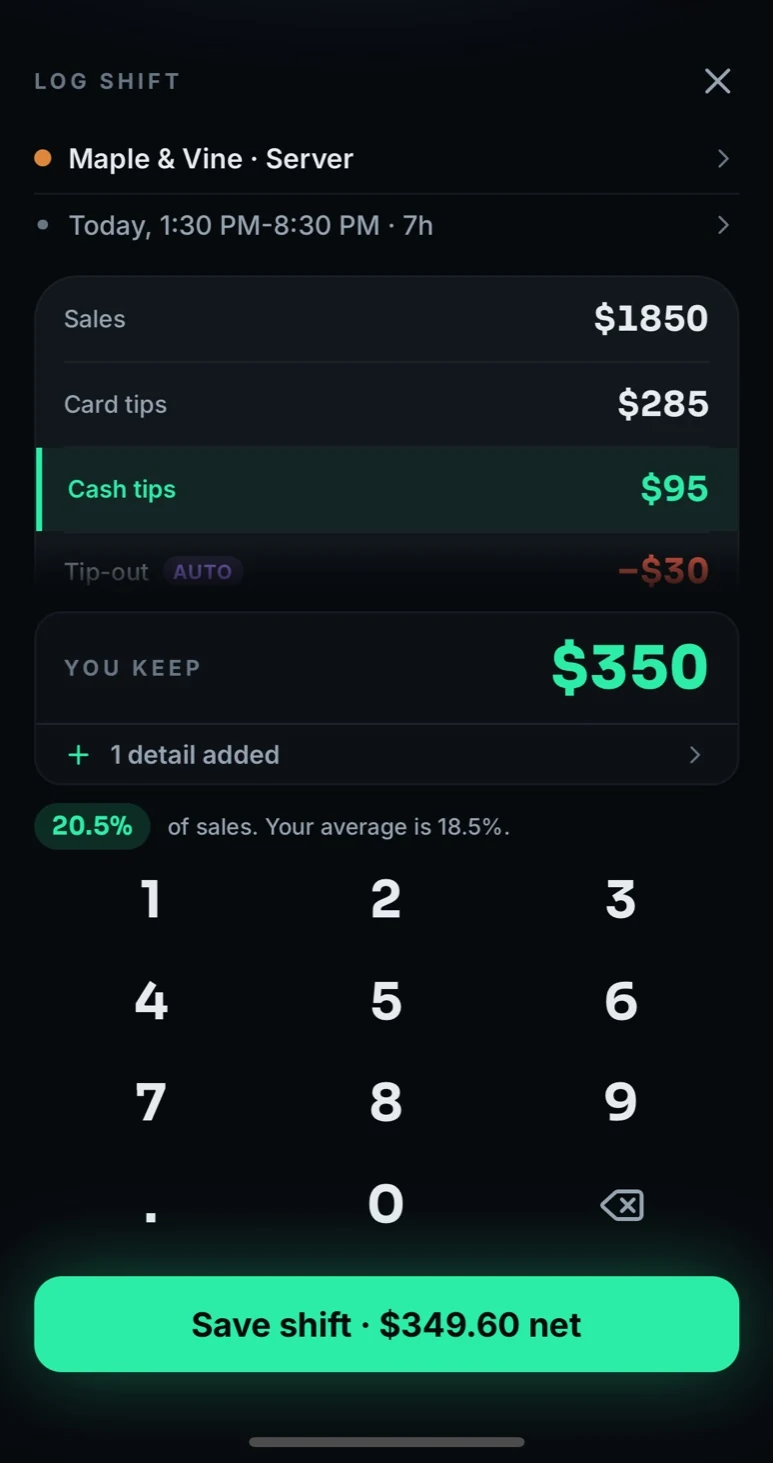
Tips, hours, sales. A numpad sized for one hand at one in the morning, on the walk to the car.
Your tip-out rules come off automatically, so the hourly on screen is money that stayed in your pocket.
Which nights pay, which section pays, and what next week is shaping up to be worth.
Privacy
No ads. Core records work offline. Log and edit shifts without an account. Your earnings records stay on your phone by default. Account and subscription services use online providers; optional cloud backup requires an active Pro subscription and your confirmation. We do not sell your data. Read the App Privacy Policy and backup and subscription details.
Guides + useful tools
Start with a worked example, check your shift with the hourly earnings calculator, or compare the base behind a tip-out rule.
Guide + worksheetThe interview goes both ways. Get clear answers about tips, paydays and your starting schedule.
 Guide + worksheet
One checkout. Two money timelines. Keep tonight’s shift separate from the payout that arrives for an earlier one.
Questions
Log each shift as it ends, while you still remember it: the tips you walked with, the hours you worked, and your sales if your tip-out runs on sales. TipsCoach stores that shift by shift so you build a real record instead of a rough memory, and it does the tip-out and hourly math for you.
Yes. You set your house rules once, as a percentage of tips or a percentage of sales, and they apply to every shift automatically. Your effective hourly is calculated after tip-out comes off, which is the number that reflects what you actually kept.
Yes. You can set up several workplaces, each with its own roles, hourly wage, tip-out rules and goal, and compare what each one is really paying you per hour.
No account is required for core shift logging, saved history and edits. Signing in can associate preview and subscription information with your account; it does not upload your shifts. Optional cloud backup requires an active Pro subscription, sign-in and your confirmation to turn it on. You can restore a saved backup after Pro expires.
Proof of Earnings generates a PDF earnings statement covering a period you choose, which you can hand to a landlord or a lender. It is built from the shifts you logged. It is your own record rather than an employer document, so treat it as supporting evidence alongside pay stubs or tax returns.
TipsCoach organizes your logged earnings for review with your accountant. Its optional set-aside planner applies a percentage you choose, without recommending a rate. Targets are not money already saved. The app does not estimate taxes owed, determine deduction eligibility, hold funds, or file taxes.
Core shift logging, saved history and edits work offline. Account management, purchase checks and sending feedback use online services. Backup is currently restricted to separately authorized testing; signing in alone does not back up your records.
Your shift records stay on your phone by default. There are no ads, and we do not sell your data or share it for advertising. Online services support accounts, subscription checks and optional feedback. Turning on Pro backup copies your records to cloud storage. See the Privacy Policy for provider, retention and deletion details.
TipsCoach is available on the App Store as Tips Coach: Tip Tracker. Core shift logging, edits, complete history, multiple jobs and the single-shift personal-best badge are free. Pro adds Coach advice, weekly recaps, earnings calendar heatmaps, detailed personal-best insights, comparisons, planning and exports. A complimentary 14-day preview starts on first open, does not automatically charge you and does not include cloud uploads. Confirm subscription prices and terms in the purchase screen.
With Pro, it draws your running total for the month against the curve of a typical month, built from the median of your previous complete months, and shades the middle half of those months behind it. The headline is one plain sentence, such as $148 behind your typical month at this point with 27 days left, and every definition is printed on the chart. Until the first shift of a month is logged it stays neutral rather than calling you behind.
Each shift can carry a mood, rough, fine or great, set in one tap after saving and shown beside the money in your history. Tags such as busy, game day or holiday show what those nights are worth against the rest. Pro daily advice states its basis, and names the study when there is one.


Free to download for iPhone.
Optional in-app purchases.

On a computer?
Scan with your iPhone camera.
Questions? Visit support or email support@xstreamnetworks.com.